One video
$12.99 per video
- 720p · MP4
- Soundtrack included
- Private MP4 download
- Unused credits do not expire
- Failed generations return the credit
MAKE THE UNFORGETTABLE CAR TREND
Turn your selfie into an Unforgettable Car trend video. Choose a car and a setting, show the 2 and 4 cards, then reveal your car as the camera clears. All from one photo—no filming or prompt writing.
Choose your car and setting. We create the 2-and-4 card transition from your photo.
Choose your portrait now. You will sign in with Google or email when you are ready to generate.
Mix any car with any scene—9 combinations to try.
Private by default: only you can see your photo and videos. Uploaded photos are kept for up to 7 days.
VIDEO EXAMPLES
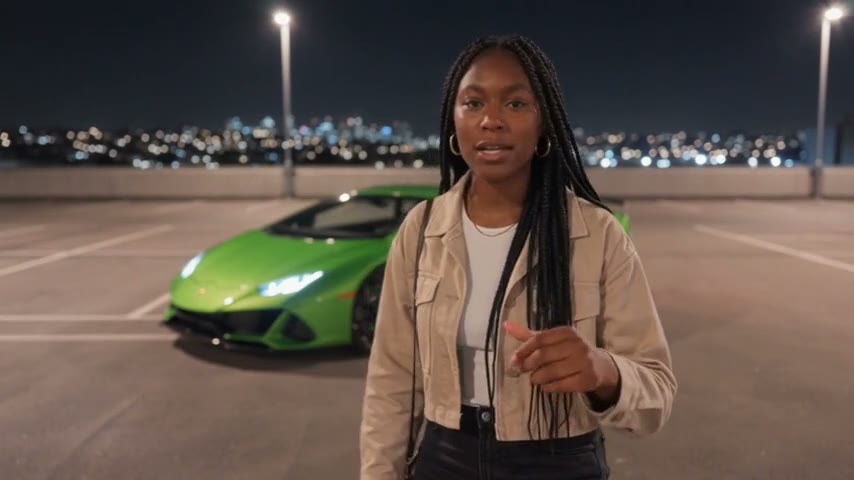
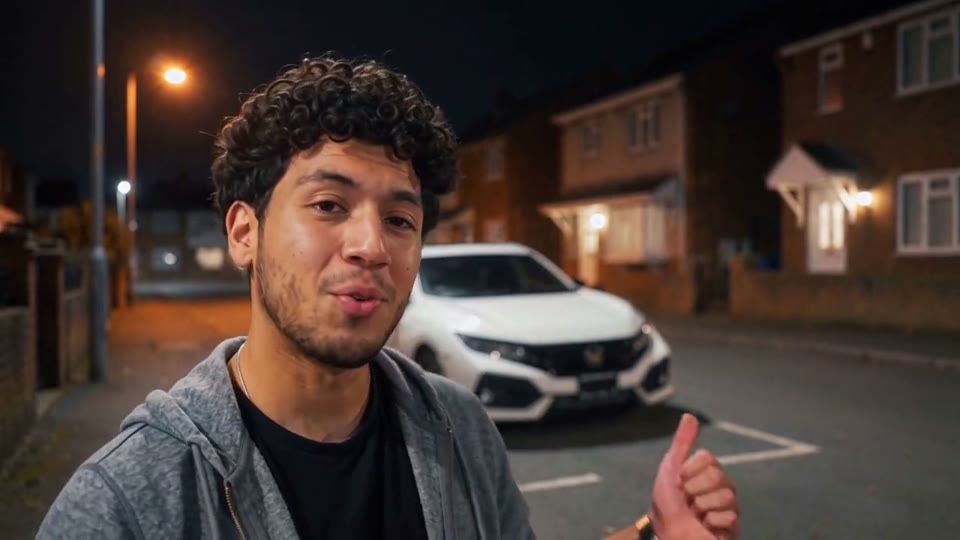
Three portraits, three car reveal moments. See the photo behind each video.



6-second previews · Full 15-second videos
Make yoursA SIMPLER WAY TO MAKE THE TREND
Make the card reveal from a selfie, even without a car. Choose a black SUV, green supercar or red coupe, then choose an underground garage, rooftop parking or city street. Mix and match 9 combinations without writing prompts.
Buy 1, 3 or 10 video credits once—no subscription, no automatic renewal. Unused credits never expire, and if a generation fails, the credit comes back automatically.
Only you can see your uploads and finished videos. Download your MP4 and share it wherever you like.
THE TREND, EXPLAINED
You may know this trend as Unforgettable Car Trend, 24 Car Trend, 24 Card Reveal or UNO Car Reveal. A person shows the 2 and 4 cards, covers the camera, then reveals a car behind them. Here, you can create an AI version with your own photo, car choice and setting.
You do not need to own a car or film the transition. Start with a clear portrait and choose the look you want.
Watch three complete 15-second examples, then pick your photo, car and scene. Three cars and three settings give you 9 combinations to try.
Understand the trend →YOUR CARD-TO-CAR REVEAL
See how the reveal works in the 15-second examples: show the 2 and 4 cards, cover the lens, then reveal the car around five seconds in. Your photo puts you in the scene, without filming the cards or a car yourself.
The portrait subject stands in the scene before the card transition.
The hand presents the 2 and 4 cards around 3.5 seconds, then covers the camera around 4.5 seconds.
The cover clears and the selected car appears in the selected scene.
The rest of the 15-second reference holds the vehicle reveal, camera motion and scene details.
Play the sample alongside the timeline: the 2 and 4 cards, the hand cover and the car reveal around five seconds in. Then upload your photo to star in your own version.
THREE SIMPLE STEPS
Choose one clear portrait—an ordinary selfie works, and you do not need a photo of yourself holding cards. JPG, PNG or WebP up to 20 MB. Sign in with Google or email when you are ready to generate.
Mix any of three cars with any of three scenes for 9 combinations. The card reveal is built in, so there is no template to find or prompt to write. Each video uses one credit from a one-time pack.
Follow progress in My videos, then download your MP4 with its included soundtrack and share it on TikTok, Reels or Shorts.
CHOOSE YOUR MAIN SUBJECT
Choose a bright, sharp portrait with one person and an unobstructed face. Use JPG, PNG or WebP up to 20 MB. Crop a group photo to one person; avoid collages, heavy filters and tiny distant faces.
A front-facing or slightly angled head-and-shoulders photo is a practical starting point. Keep the eyes, nose and mouth visible; avoid sunglasses, a hand covering the face, deep shadows or strong motion blur. If you crop a group photo, leave enough space around the head rather than cutting through the hair or chin.
Look at the carpark, rooftop and street examples to see how different portraits turn out. Choose a recent photo for your current look, or one with the hairstyle and outfit you love.
Only upload photos you have permission to use, with the consent of the person pictured.
Read the photo guide →WHAT YOU GET
Your photo makes you the main character, and the built-in reveal handles the cards, the lens cover and the car. Every video is generated fresh, so yours is one of a kind.
You star in the reveal with the car and setting you picked. Use your own photo or one you have permission to use.
The 2-and-4 cards, the lens cover and the car reveal everyone recognizes—recreated around you, with no filming or editing.
Your 15-second, 720p MP4 waits privately in My videos. Download it and post it wherever your friends will see it.
CHOOSE YOUR WAY TO MAKE IT
Use Unforgettable Car AI for one-portrait generation with independent car and scene choices. CapCut templates arrange existing media and can help with a later vertical edit or music; CapCut is not required to generate here. Film it yourself for precise performance control, or choose a general AI tool for custom references and prompts.
| Compare | Unforgettable Car AI | Film it yourself | CapCut template | Your own AI prompt |
|---|---|---|---|---|
| Editing effort | Upload, generate and download—no shooting or editing | Shoot, choose takes and edit the final clip | Add your media and adjust the template as needed | Prepare references, refine prompts and review or edit results |
| What you prepare | One clear portrait of the main subject | Performers, a selected scene, a camera and editing time | The photos or clips required by the selected template | A portrait, scene instructions and supported video references |
| Scene and control | Three car choices × three scenes, chosen independently | Choose the setting, choreography, scene details and camera work | Preset timing and effects; editable elements depend on the template | More room to change instructions; reference support varies by model |
| Who changes | You appear in the card reveal with your chosen car and scene | The people you film | Depends on the template and any included AI features | Depends on the model, references and prompt |
| Audio | Built-in soundtrack included in the MP4 | Record or add permitted audio and align it yourself | Template audio or editing options, where available | Audio support or separate editing depends on the tool |
| Output | 15-second 720p MP4 | Determined by your recording and export settings | Check the template and export settings | Check model duration, resolution and export limits |
| Cost | 1 video for $12.99, 3 for $34.99 or 10 for $99.99; USD before applicable taxes, no subscription | Your time, equipment and any production costs | Free or paid options; check the selected template | Provider charges and any retries or post-editing |
| Choose it when | You want the viral card reveal with your photo, without filming | You want direct control over the whole performance | You want to arrange existing media with preset edits | You want a different scene or to experiment with prompts |
CapCut templates vary in the photos, editing tools and export options they support. Check your chosen template, including any AI features and charges, before starting. CapCut’s template guide ↗
FROM DOWNLOAD TO YOUR POST
Yes. Download your MP4 with its included soundtrack, then post it on TikTok, Reels or Shorts. If you choose different music in the social app, replace the existing audio to avoid overlapping tracks.
Save your MP4 from My videos and keep the original file as the source for any edit.
Post the landscape clip as is, or place it on a 9:16 canvas so the cards, the car and you all stay in frame.
Your video comes with a soundtrack timed to the car reveal, so you can post it as is. Prefer a different sound? Turn off the original audio in the app first so the tracks do not overlap.
ONE-TIME VIDEO PACKS
Pay once for the videos you want to make. No subscription, no automatic renewal, and unused credits never expire. Each video uses one credit.
$12.99 per video
$11.66 per video
$10.00 per video
A LITTLE CONTEXT
Discover the viral 2-and-4 card car reveal, also known as 24 Car Trend or UNO Car Reveal, and learn how to make it with your photo.
02 / GUIDEMake an Unforgettable Car trend video from your photo: choose a car and scene, then download your MP4 with the included soundtrack. Includes photo tips, pricing and sharing advice.
BEFORE YOU CREATE
Compare your options and see what to expect from your Unforgettable Car AI video.

MORE TRENDING EFFECTS
The Unforgettable Car effect also has its own page on AI Effect Studio, a collection of trending AI video effects. Make the 2-and-4 card reveal there, then explore other viral effects in the same place.
BEFORE YOUR FIRST TAKE
Sign in with Google or email, upload a clear portrait, and choose your car and scene. Download your MP4 with the included soundtrack from My videos. The 2-and-4 card transition is included. Watch three free examples before buying. Read the full answer →
Visit unforgettablecar.org to make the trend in your browser. Upload one portrait and mix three cars with three scenes: 9 combinations. New videos use the 720p MP4 setting and include the same soundtrack as the full examples, with private downloads in your account.
Watch all three full examples with the included soundtrack for free, without signing in. Creating your own video costs $12.99 USD before applicable taxes, with no subscription. Watch the examples before buying a pack. Read the full answer →
You can view examples, prices and guides without an account. Sign in with Google or email to upload a photo, buy credits and generate. Return with the same account to follow progress and download your finished videos.
Yes. Start with one clear selfie or portrait, then choose a car and scene. AI creates a video featuring you in the 2-and-4 card reveal. No car footage or editing is needed. If you use a group photo, crop it to one person first. Read the full answer →
Unforgettable Car AI is a simple option if you want this specific trend from one photo: choose your car and scene, generate, then download privately. You pay once, with no subscription. If you already have footage, an editing template may be more useful; for custom actions, consider a general AI video tool. Watch complete examples and compare the price before choosing. Read the full answer →
Yes. Upload your portrait and choose a car and scene. The card reveal and built-in soundtrack are included, so you do not need CapCut or a written prompt. An editor is optional for captions, a vertical canvas or replacing the audio.
That is the Unforgettable Car Trend, also known as 24 Car Trend, 24 Card Reveal and UNO Car Reveal. A person shows the 2 and 4 cards, covers the camera, then reveals a car behind them. You can make an AI version with your own photo at Unforgettable Car AI.
Choose a sharp, well-lit portrait with an unobstructed face. Avoid collages, heavy filters, extreme angles and distant figures. JPG, PNG and WebP are accepted, up to 20 MB. You do not need to photograph yourself at a card reveal.
Your photo helps the AI recreate your appearance, with your chosen car and scene. Facial details, hands, clothing and vehicle details can vary; an exact match is not guaranteed. Watch the examples to decide whether the style suits you.
New videos are 15-second, 16:9 MP4s generated using the 720p setting, with the same built-in soundtrack as the full examples. Save them from My videos. The examples are also 15 seconds: car park and street are 720p, while rooftop is 480p. Earlier videos may be silent; check each video’s audio label.
Yes—you only need your portrait. Choose a black SUV, a green supercar or a red coupe, then pick your setting. The car is created by AI, so a specific brand, model or logo is not guaranteed. You do not need to upload a car photo.
One video is $12.99, three are $34.99 and ten are $99.99 USD before applicable taxes. Pay once, with no subscription or automatic renewal. Each generation uses one credit.
Unused video credits do not expire. Finished videos are stored for 30 days, so download your MP4 before expiry. Photos are kept for up to 7 days. Buying a pack does not extend storage for existing files.
Generation time varies with demand. You can leave the page and return to My videos with the same account to check progress. Wait for the current video to finish before starting another.
If generation fails, one video credit is automatically returned once the failure is confirmed. If the video is still processing, check My videos before trying again. For a payment or refund question, contact support with your video ID and receipt.
Uploads and generated videos are private to your account. You can download or delete a finished video in My videos. Deletion is permanent and does not restore a credit. Public examples require separate permission.
Use photos you own or have permission to upload, and get the person’s consent. The result is AI-generated entertainment. Do not present it as footage of something that person actually did.
Download your MP4 from My videos within 30 days, then share it yourself. There is no automatic social posting. Review the result and your permissions before sharing; any crop should keep the main subject visible.
The studio exports an MP4 you can crop in an editor. A vertical crop can remove cards, hands, the car or the moving main subject, so check the whole clip or place the full video inside a vertical canvas. There is no built-in vertical export or automatic posting.
MAKE YOUR UNFORGETTABLE CAR VIDEO